
Landscape Pro: photo retouching reinvented
Retouching photographs isn't easy; complex tools have existed for a long time (Gimp, Photoshop, etc.), but in recent years powerful, polished and intuitive software has appeared. We're going to take a closer look at one of them: Landscape Pro. And let's get this out of the way: it's excellent.
Landscape Pro: what is it?
The answer is simple: it's photo retouching software for photographers. (Unlike Photoshop or Gimp, which are general-purpose image manipulation programs.) While Landscape Pro is very "landscape"-oriented in its approach to retouching, that's not its only talent. In fact Landscape Pro works in layers, letting the user choose the type of layer. We'll come back to that.
Landscape Pro is available in two versions: Standard & Studio. The main differences are the ability to work on Raw files, in 16-bit, and to integrate with Photoshop or Lightroom in the Studio version. There's also a free version that lets you get a real feel for the software before buying.
Landscape Pro: what does it do?
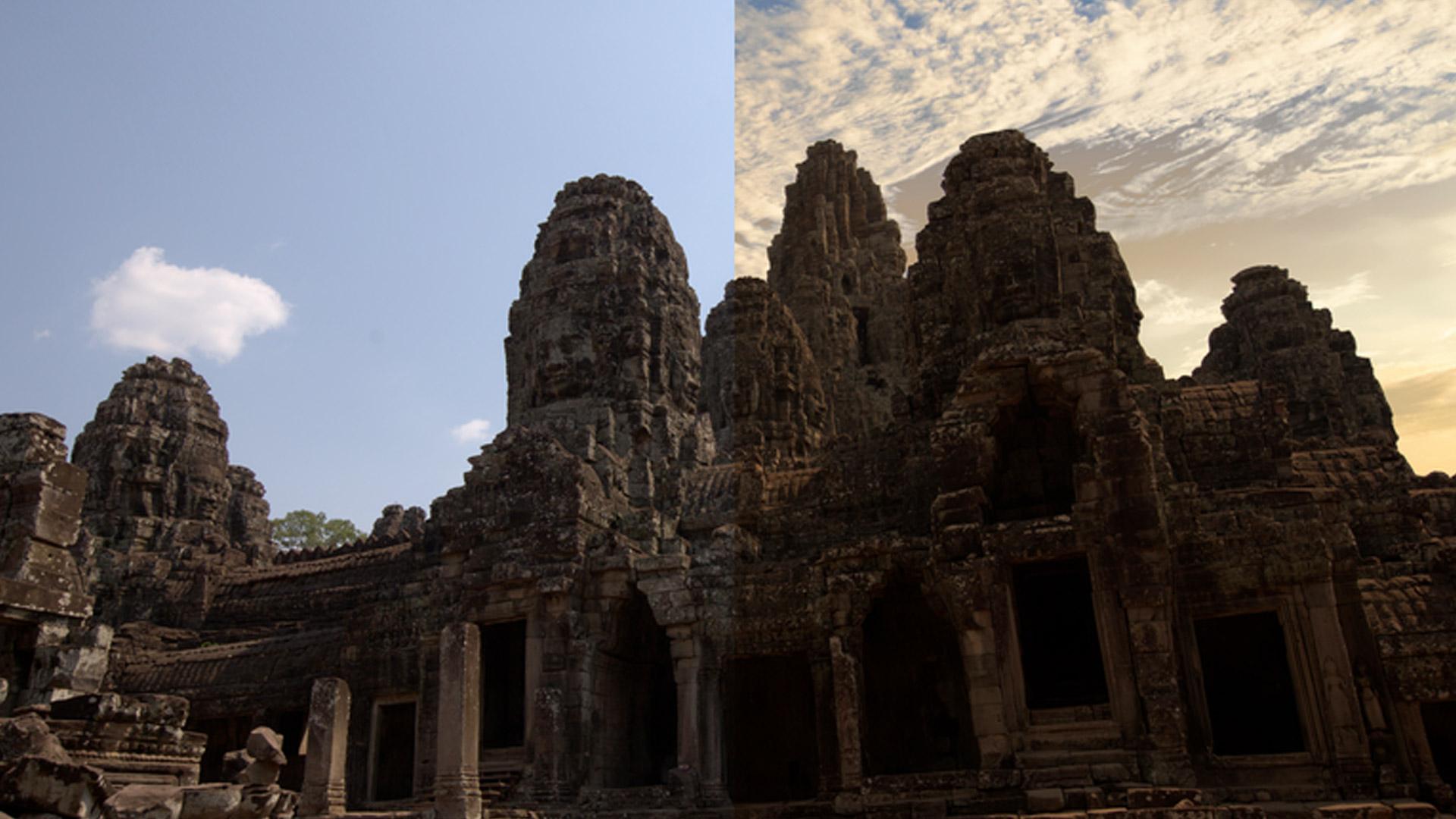
Right then — no useless waffle. Here are a few photos retouched with Landscape Pro in 5 to 10 minutes each. Some retouches are deliberately pushed too far aesthetically to give you a sense of the range of possibilities. After that we'll see in detail how Landscape Pro works.
The unretouched photo is on the left and the retouched one on the right. Elementary!
Halong Bay – Vietnam
The temples of Angkor – Cambodia
Note: If you have any thoughts on the retouching and its impact on the original image, please leave a comment.
Landscape Pro: how does it work?
We're now going to walk through a retouching process step by step. To make the example meaningful, I'll use the image "View of Hué" in Vietnam, below.
It's a raw image, straight off the sensor. I'll deliberately apply a fairly heavy retouch, which alters the original look considerably.
Selecting zones
Landscape Pro works by zone — Photoshop users will see a parallel with layers and masks.
Once the image is open in Landscape Pro, the first step is to identify the different zones of the image and assign each one a label. The label determines the type of content. So for our example image we select the sky, the water, the building and the trees. To make the selection, just grab the label in the menu on the left and drag-and-drop it onto the image. The whole thing takes 30 seconds.
Refining the zoning
Then, when you move to the next retouching step, Landscape Pro performs automatic zoning. For simple images, the zoning is generally good.
But you can correct it very easily — brush size and hardness tools are available and very intuitive.
Applying effects
Once the zones are outlined and labelled, it's time to retouch. Anything is possible here: use the built-in effects, do your own edits, or start from a preset and tweak it. Basically, the only limit is your imagination.
Below you'll see the steps I used. Again, you work by zone. The effects on offer depend on the content selected.
I deliberately pushed the retouching on the sky, but you're free to do as much, less, or much more.
Fixing details
Of course, not all images are simple: there are antennas in the sky, trees creeping into the water or the sky, and so on. For all that, Landscape Pro provides tools to work on the details. And it doesn't matter whether your retouches are already done — you can rework the zones and labels at any time. So, below, I hadn't noticed that one of the roofs had been interpreted as sky; I just had to grab the zoning tools again and correct it.
For each type of retouching, Landscape Pro offers a suitable tool — and the online help is very clear, letting you get familiar with how it works quickly.
The final result
View of Hué – Vietnam
As with any retouching, the final result is a matter of taste, but I do encourage you to download the trial version to make up your own mind about this disconcertingly simple and effective software.
Landscape Pro in summary
A landscape-specialised retouching tool, Landscape Pro is perfectly suited to any skill level for enhancing landscape photos in a more or less natural way.
Anthropics Technologies currently has a special offer on its products:
Standard version: €39.95
Studio version: €69.95